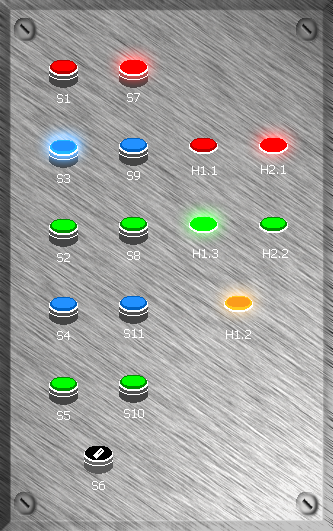
2.0 Function Description
The two conveyor belts are to be converted from DC motors to AC motors. The motors are connected to the frequency converters via 4-wire connection cables. The Micromaster 420 is expanded with the Profibus option module, which enables the connection of a Profibus DP network. The network is realized with 9-pin SUB-D connectors and a Profibus DP cable according to DIN 19245 and is coupled to the S7-315 2DP. The control is created with the Step 7 V5.3 program in the FBD programming language, and transferred to the PLC via a USB/MPI adapter. The control cabinet required for the operation was pre-configured under a test routine. All push buttons, indicator lights, analog as well as digital inputs and outputs are available. The conveyor belts can be controlled according to the following design:
Push Button 01 HPS Conveyor 1 stop / Red
Push Button 02 HPS Conveyor 1 starts right slowly / Green
Push Button 03 HPS Conveyor 1 starts right fast / Blue
Push Button 04 HPS Conveyor 1 starts left slowly / Green
Push Button 05 HPS Conveyor 1 starts left fast / Blue
Push Button 06 System / Program stop
Push Button 07 HPS Conveyor 2 stop / Red
Push Button 08 HPS Conveyor 2 starts right slowly / Green
Push Button 09 HPS Conveyor 2 starts right fast / Blue
Push Button 10 HPS Conveyor 2 starts left slowly / Green
Push Button 11 HPS Conveyor 2 starts left fast / Blue
Indicator Light H1.1 HPS Conveyor 1 stopped / Red
Indicator Light H1.2 System OK / Orange
Indicator Light H1.3 HPS Conveyor 1 running / Green
Indicator Light H2.1 HPS Conveyor 1 stopped / Red
Indicator Light H2.2 HPS Conveyor 2 running / Green
During commissioning of the system, this is indicated by indicator light H1.2 (Orange). When the system is switched off, H1.2 must go out after 5 seconds; if this does not happen, a program interruption has occurred. This indicates malfunction of power supply networks as well as modular and mechanical units. If at least one of the conveyor belts is running, this is indicated by indicator lights H1.3 (Green) and H2.2 (Green). The red indicator lights signal that the program is in the Stop state and no technical fault exists.